
Federal Bank Whatsapp Banking
Last Updated : May 9, 2025, 6:29 p.m.
Federal Bank introduced WhatsApp Banking, powered by its AI-based virtual assistant FEDDY, to provide customers with a convenient, secure, and 24/7 accessible platform for banking services. Launched to enhance digital banking, it allows resident and NRI customers to access a range of services for savings accounts and current accounts through a chat-based interface on WhatsApp. The service, known as the WhatsApp Hub, was further expanded with features like the WhatsApp Lending Platform in September 2023, enabling seamless applications for pre-approved personal loans
This service enables customers to access a wide range of banking services directly via WhatsApp, providing convenience and accessibility 24/7.
Federal Bank Whatsapp Banking Number
To access Federal Bank savings account WhatsApp Banking services, you can connect with their virtual assistant, Feddy, through the following numbers:

Federal Bank WhatsApp Banking Numbers
- Primary Number: +91 9633 700 800
- Send a "Hi" from your registered mobile number to initiate banking services.
- Send a "Hi" from your registered mobile number to initiate banking services.
- Alternate Number: +91 9633 600 800
- Also available for accessing banking services via WhatsApp.
- Also available for accessing banking services via WhatsApp.
- Missed Call Activation: Give a missed call to 8095 500 077
- You'll receive a link to start chatting with Feddy on WhatsApp.
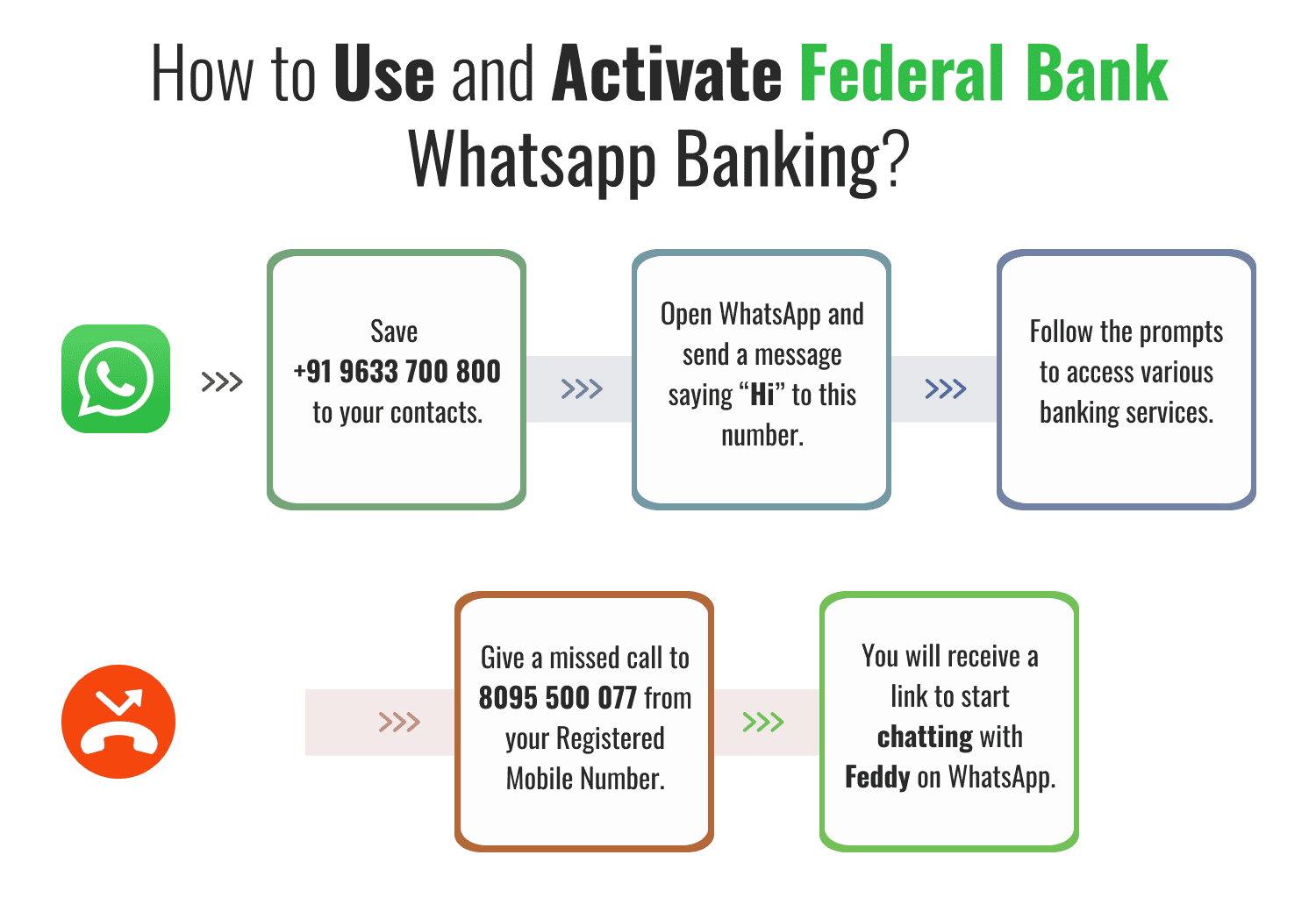
How to Use and Activate Federal Bank Whatsapp Banking?
You can activate the service for a Federal Bank savings account through any of the following methods:
- WhatsApp Message:
- Save +91 9633 700 800 to your contacts.
- Open WhatsApp and send a message saying “Hi” to this number.
- Follow the prompts to access various banking services.
- Save +91 9633 700 800 to your contacts.
- Missed Call:
- Give a missed call to 8095 500 077 from your registered mobile number.
- You will receive a link to start chatting with Feddy on WhatsApp.
Use Federal Bank WhatsApp Banking
Once activated, you can interact with Feddy by sending simple commands or queries on WhatsApp. Some of the services available include:
- Account Services:
- Account balance check
- View mini statements
- Block debit cards
- Submit Form 15G/H
- Account balance check
- Loan Services:
- Check pre-approved loan offers
- Generate loan, deposit, TDS, and balance confirmation certificates
- Check pre-approved loan offers
- Other Services:
- Inquire about fixed deposit or loan summaries
- Check reward points
- Perform fund transfers, bill payments, and mobile recharges (post one-time registration)
- Inquire about fixed deposit or loan summaries
For certain transactions like fund transfers and bill payments, a one-time registration on the Feddy Registration Portal is required.
Federal Bank Whatsapp Banking Services
Below are some of the services that can be accessed using Federal Bank Whatsapp services.
Enquiry-Based Services (No registration required)
- Account Balance : Federal Bank Savings account balance check
- Mini Statement : View the last 10 transactions in your account.
- Account Statement : Request a detailed account statement.
- Debit Card Controls Status : Check the status of your debit card controls.
- Block Debit Card : Block your debit card in case of loss or theft.
- Form 15G/H Submission : Submit tax forms directly through WhatsApp.
- Pre-Approved Loan Eligibility Check : Check eligibility for pre-approved loans.
- Generate Certificates : Obtain loan, deposit interest, TDS, and balance confirmation certificates.
- FD and Loan Summaries : View summaries of your fixed deposits and loans.
- Reward Points Enquiry : Check your accumulated reward points.
Transactional Services (One-time registration required)
To access the following services, a one-time registration on the Feddy Registration Portal is necessary:
- Fund Transfers : Transfer funds to other accounts.
- Bill Payments : Pay utility bills directly through WhatsApp.
- Mobile Recharges : Recharge your mobile phone.
- Deposit Opening : Open new deposit accounts.
- Apply for Debit Card/FlashPay : Request new debit cards or FlashPay services.
- Update Email ID : Update your registered email address.
- Cheque Book Request : Request a new chequebook.
Federal Bank Whatsapp Number for Balance Enquiry
To check your account balance using Federal Bank WhatsApp Banking, use the official number +91 9633700800.
Steps:
- Save +91 9633700800 in your contacts.
- Send "Hi" from your bank-registered mobile number on WhatsApp.
- Type "What is my account balance?" or "balance" and follow any prompts (e.g., OTP for authentication).
Your account balance will be displayed securely. Use only this number for Federal Bank WhatsApp Banking.
Frequently Asked Questions (FAQs)
What is the WhatsApp number for Federal Bank?
How do I check my federal bank balance?
How do I contact the Federal Bank?
Best Offers For You!
Credit Card by Top Banks
Banking
- SBI Mobile Banking
- ICICI Bank Mobile Banking
- HDFC Bank Mobile Banking
- Axis Bank Mobile Banking
- Bandhan Bank Mobile Banking
- Federal Bank Mobile Banking
- IndusInd Bank Mobile Banking
- IDFC First Bank Mobile Banking
- Kotak Mahindra Bank Mobile Banking
- RBL Bank Mobile Banking
- YES Bank Mobile Banking
- IDBI Bank Mobile Banking
- Bank Of Baroda Mobile Banking
- Bank of India Mobile Banking
- Canara Bank Mobile Banking
- PNB Mobile Banking
- Indian Bank Mobile Banking
- Indian Overseas Bank Mobile Banking
- Punjab and Sind Bank Mobile Banking
- Karur Vysya Bank Mobile Banking
